
Dottr
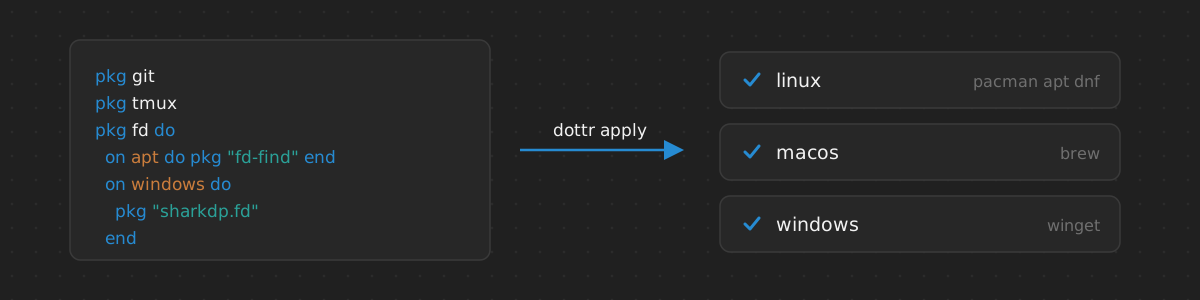
Sets up a machine from a manifest of packages, configuration, and shell scripts, on Linux, macOS, and Windows.
- C
- MIT license
- github.com/tkamucheka/dottr
Dottr sets up a machine from a manifest. The manifest declares the packages
and configuration of the machine as units, written in a small language: a
unit installs a package, or runs shell scripts gated on checks of the host,
and may depend on other units. dottr apply brings the machine to the
declared state, and is run again whenever the manifest changes.
pkg git
pkg tmux

pkg tpm do
  needs git, tmux

  local TPM_DIR = "@{dottr.env.home}/.config/tmux/plugins/tpm"
  check directory TPM_DIR
  apply_unless TPM_DIR do
    shell do
      ```
      git clone https://github.com/tmux-plugins/tpm "$TPM_DIR"
      ```
    end
  end
end
Features
- Dependencies between units, applied in order; a failed unit skips only the units that depend on it.
- A plan before any change:
dottr planprints the packages and scripts thatapplywould run. - The system package manager: pacman, apt, or dnf on Linux, Homebrew on macOS, and winget on Windows.
- One manifest for several systems:
onblocks select units, statements, or scripts by operating system or package manager. - Scripts as written: shell blocks embed
sh,bash,zsh, or PowerShell scripts without escaping, with the unit’s variables in their environment. - Editor support: a formatter, a language server, a tree-sitter grammar, and a VS Code extension.
One Manifest, Several Systems
Package names and scripts that differ between systems go in on blocks:
pkg fd do
  on pacman, dnf, brew do
    pkg fd
  end
  on apt do
    pkg "fd-find"
  end
  on windows do
    pkg "sharkdp.fd"
  end
end
dottr check validates the manifest for every system and names the systems
on which an error occurs; plan and apply use only what applies to the
system at hand.
Installation
On Linux and macOS:
curl -fsSL https://raw.githubusercontent.com/tkamucheka/dottr/main/install.sh | sh
On Windows, in PowerShell:
irm https://raw.githubusercontent.com/tkamucheka/dottr/main/install.ps1 | iex
The scripts install dottr, dottr-format, and dottr-lsp for the current
user. Options, upgrading, and removal are described in the
installation guide.
Usage
Write a manifest, packages.dotfile, and in its directory run:
dottr check              # validate the manifest
dottr plan               # show what apply would do
dottr apply              # apply every unit
dottr apply tmux         # apply tmux and the units it needs